

Building a production grade MCP server with OutcomeCI Part 1: Feature intake
Building KindFind, a free public MCP and API service for nonprofit information, starts with bringing AI and people together to turn Slack requests into reviewed GitHub specifications.
We’re building KindFind, an MCP and API service that will make information about 501(c)(3) organizations easier for people and agents to use. We plan to make that access free to the public internet. Someone building a useful tool for a nonprofit, researching organizations, or helping people find causes to support should be able to build on the same foundation.
We’re doing the work in the open at outcomeci/kindfind, using OutcomeCI to coordinate the agents, people, and systems involved. This series follows the project from its first feature request toward a production grade service: data ingestion, MCP tools, tests, deployment, and the work of keeping it useful once other people depend on it.
The first module is feature intake. Before an agent writes code, we want the person asking for a feature and the agent helping build it to agree on what a useful result actually means.
Why we think feature intake is broken
A request arrives in Slack. Someone turns it into a ticket. An engineer picks it up and discovers that “support nonprofit lookup” leaves most of the important decisions unanswered. What identifies an organization? Which source should we trust? What does a missing record mean? How fresh does the data need to be?
Our view is that too many organizations are adding AI to this process without changing how people participate. An agent can expand a sentence into a polished specification, but that can also turn unstated assumptions into convincing requirements. By the time someone reviews the code, those assumptions may have shaped the database, the API, and the tests.
We want AI and people to work together while the specification is taking shape. The agent reads existing context, notices gaps, asks questions, and writes a proposal. The person supplies intent, weighs tradeoffs, and decides what belongs in scope. The agent then turns those decisions into something another person or agent can implement and verify.
That interaction needs a place in the workflow. A checkbox saying “human review required” tells us very little unless we know what the person is reviewing, when they can change it, and what their approval permits.
KindFind gives us a real problem to work through
The Model Context Protocol gives AI applications a standard way to connect to tools and data. For KindFind, we want that connection to make nonprofit information easier to retrieve and interpret, with an API available to other software as well.
The underlying information comes with its own structure and limits. For example, the IRS publishes its Exempt Organizations Business Master File extract as CSV files. Turning a source file into a useful agent tool involves deciding how to identify records, preserve provenance, handle ambiguity, and explain which snapshot an answer came from.
Those decisions belong in the requirements. If an EIN lookup finds no match, the response needs a meaning we have agreed on. If multiple organizations have similar names, the agent needs enough information to handle that ambiguity. If a source changes, we need to know what was imported and when.
Free public access also gives the later modules a concrete operating problem. We will need to work through reliability, costs, usage limits, and data updates as the service develops. Production grade is the standard we are working toward throughout the series.
Two workflows connect Slack to the backlog
Our intake starts where the request already happens: a mention of the
OutcomeCI Slack app in #build, or a direct message to the app. The ensuing
discussion stays in the originating thread.
The first workflow is the Slack dispatcher. It classifies the request and passes its Slack context to the appropriate child workflow. A KindFind feature proposal goes to intake. An explicit implementation request can go to the existing GitHub PR workflow, and a research question can go to the research workflow. A KindFind request that mixes scoping and implementation goes through intake first.
The second is KindFind feature intake. It owns the conversation that turns a request into an issue. Its sequence makes the division of work explicit:
| Stage | Agent work | Human input |
|---|---|---|
| Read and scope | Read repository context and existing issues; propose one bounded feature | Supply the original need |
| Clarify | Ask focused questions and revise the proposed scope | Resolve open questions and approve the scope |
| Draft | Write the proposed issue with requirements and acceptance criteria | Read the exact title and body |
| Review | Discuss changes and present revised drafts | Approve the final unchanged draft, or reject it |
| Publish | Create the approved GitHub issue and return its link in Slack | Continue planning from the published issue |
At the first stage, the agent looks for a README, relevant specifications, project principles, and related issues. A new repository may have little of that context. The instructions tell the agent to identify what is missing and ask useful questions without inventing project decisions.
The scope conversation is deliberately small: one independently useful feature, a few important questions at a time, and explicit assumptions. A request can get narrower as the conversation progresses. That is useful progress when it makes the result easier to build and test.
In our first intake, the request was to seed a local SQLite database for KindFind. OutcomeCI proposed a small initial feature and asked three questions: which source to start with, how to describe the records, and which lookups needed to work.
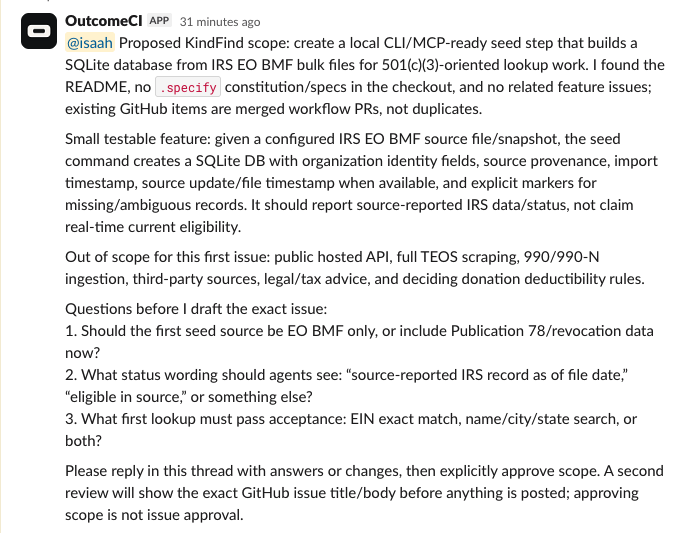
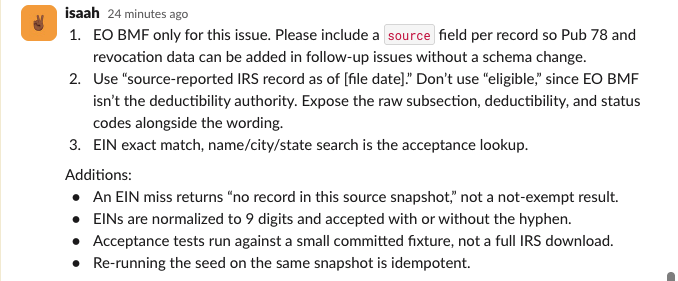
The human reply made the feature more precise. We chose one source for this issue, specified the wording for a lookup miss, and added requirements for EIN normalization, fixture-based tests, and repeatable imports. These decisions became part of the specification the implementation will be measured against.
Scope approval and issue approval are different decisions
We use two human checkpoints because they answer different questions.
The first asks whether we agree on the problem, the intended users, and the boundaries of the work. Once the requester approves that scope, the agent can draft the specification.
The workflow first reflected our changes back to us and asked for explicit approval of the revised scope. Supplying answers had refined the proposal; the approval was still a separate step.
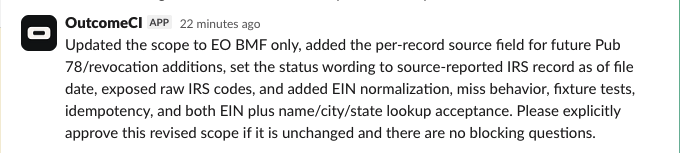
The second asks whether this exact title and body should become a public GitHub issue. The draft may expose an assumption that was easy to miss in conversation. It may also contain detail the requester wants to keep out of a public repository. This checkpoint gives them the chance to correct both.
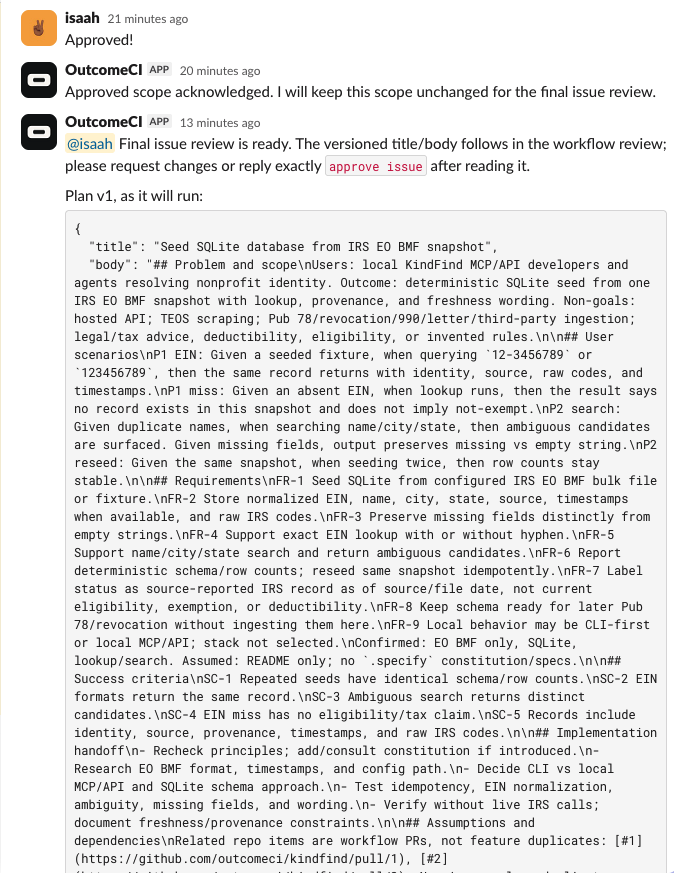
The workflow restricts these conversations to the Slack user who made the request. A revised draft needs another approval. Answering a question, staying silent, or approving an earlier version does not authorize publishing the new one. Rejection, timeout, or reaching the conversation limit stops intake without creating an issue.
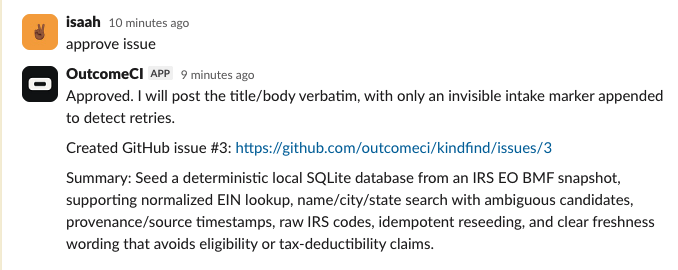
The final approve issue reply authorizes publication. In this run, OutcomeCI
then returned the link to the created issue in the same Slack thread.
In the workflow definition, the issue-writing step is conditional on the final review:
- create_issue:
    when: review.decision == "approved"
    reason: create_issue.md
    with: [trigger, review.plan]
    can:
      - github.write: {repo: {owner: outcomeci, name: kindfind}}
The full workflow also attaches a policy limiting the write to the approved
issue in outcomeci/kindfind. The Slack and GitHub credentials live in the
OutcomeCI Vault, with grants to the workflow. The intake agent gets a defined
job and the access needed to perform it.
A specification that the next workflow can use
The issue format takes a Spec Kit approach: establish the intended behavior and its purpose before planning the implementation. This intake workflow applies that approach to specification and clarification; technical planning, task breakdown, and implementation follow in later modules.
The draft captures the problem and scope, prioritized user scenarios, numbered functional requirements, measurable success criteria, assumptions, dependencies, and an implementation handoff. The point of those sections is to make decisions visible. An acceptance example should let the next person tell whether the requested behavior works.
You can see a concrete result in issue #3, Seed SQLite database from IRS EO BMF snapshot. It narrows the first data feature to a repeatable local seed from one source snapshot. It includes EIN lookup and name/location search, while leaving the hosted service and additional data sources for later work.
Several details show why intake deserves this attention:
- EINs with and without a hyphen should resolve to the same record.
- A lookup miss should say that no record exists in the imported snapshot.
- An ambiguous name search should return the distinct candidates.
- Missing fields should remain distinguishable from empty strings.
- Importing the same snapshot again should produce stable schema and row counts.
- Records should retain source information and relevant timestamps.
These are requirements a builder can turn into tests. They also preserve the meaning of the data: the issue explicitly limits responses to what the source snapshot reports. The broader KindFind mission gives us direction; this issue gives us a manageable first increment.
The publication step preserves the approved title and body, adding only an invisible marker used to recognize the same intake on a retry. It checks for an existing issue before creating one and reports uncertainty if it cannot confirm the result. That reduces duplicate creation during serial retries; simultaneous independent runs still need care. We want the workflow to report what it can establish about a write.
Inspect the completed run in OutcomeCI
Slack gives the requester a place to discuss and approve the work. The OutcomeCI run view lets us inspect its execution: how the run started, its status, recorded usage, and the files saved along the way.
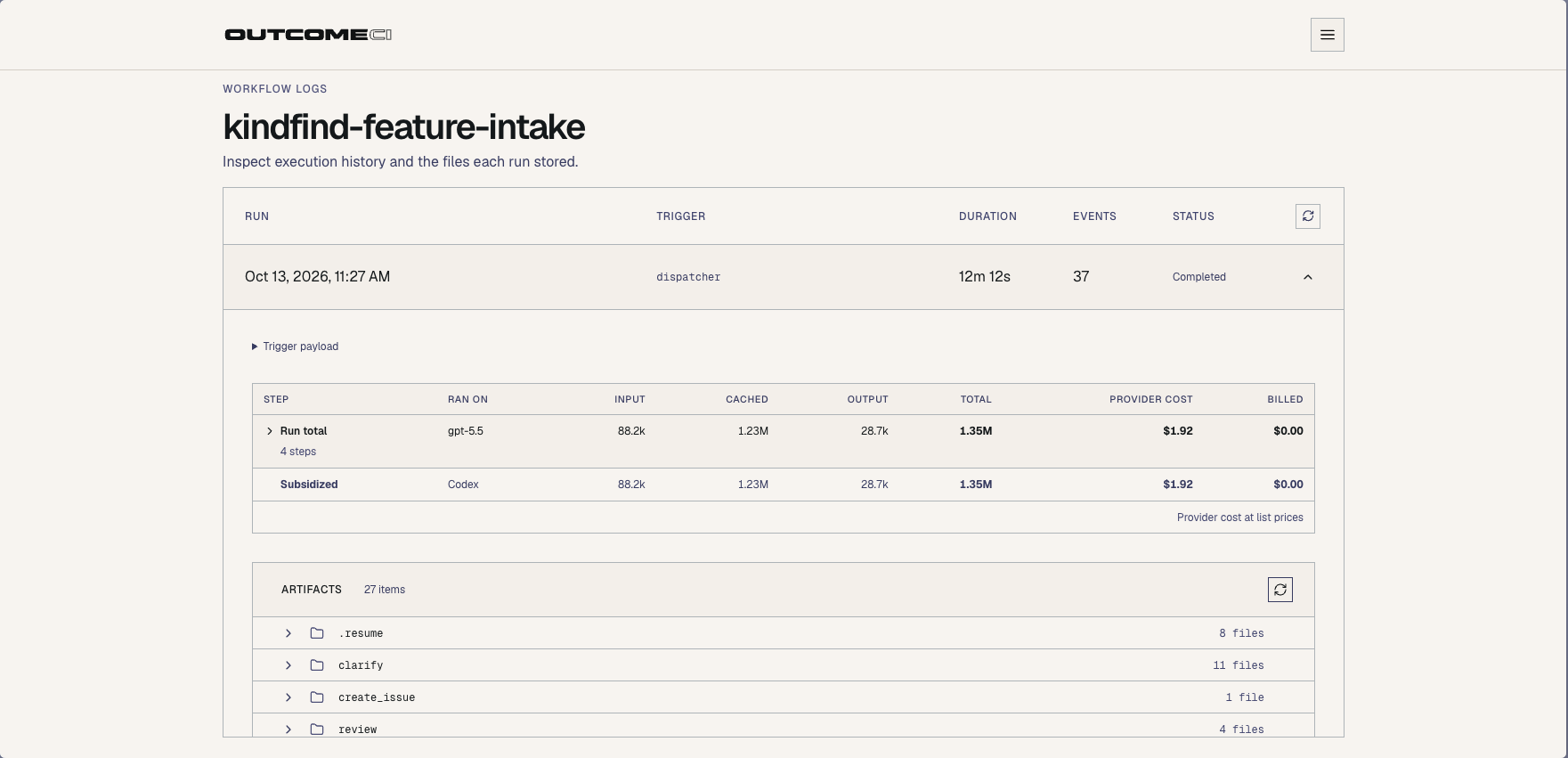
Open the run screenshot at full size to inspect the usage table and artifact list.
We can follow the approved request from the Slack thread to the resulting GitHub issue and inspect the run that connected them. That gives us concrete evidence to examine when improving the workflow or investigating a result.
Keep the workflow beside the project
The workflow is part of the project’s source. Each definition and its instructions live together:
.outcomeci/workflows/
  feature-intake/
    workflow.yml
    scope.md
    clarify.md
    specification.md
    review.md
    create_issue.md
    ...
  slack-dispatcher/
    workflow.yml
This makes changes to the process reviewable. If we change what the agent asks, what approval means, or what it can publish, that change has a diff alongside the application’s other work. You can inspect the intake definition and instructions and the dispatcher source in the repository.
The public OutcomeCI Workflow Sync action validates these bundles in pull requests. With workspace credentials and workflow ownership configured, it publishes changed revisions after merge, including changes to the Markdown instructions. The repository’s GitHub workflow shows the validation and publishing setup.
To try the intake process in your own workspace, open each published workflow and choose Clone workflow:
Point the dispatcher's feature-intake route at your cloned intake workflow, configure its other child-workflow targets, and complete the required setup. Configure your Slack and GitHub connections, and change the repository-specific instructions and grants together. The Slack app setup guide covers mentions, direct messages, and the credentials needed to connect Slack to OutcomeCI.
Follow the issues into the next module
The KindFind issue list is where readers can follow the backlog produced by intake. The repository will hold the implementation, tests, and workflow changes as the project develops.
In the next module, we’ll take an issue through technical planning and into implementation, then check the result against its acceptance criteria. That gives us a continuous thread from a person’s request to an agreed specification, the code that implements it, and the evidence that it behaves as intended.
Follow the KindFind series as we build toward a free, public MCP and API service that other people can depend on.